Open source · MIT · Windows 10 & 11

Anime Dice Macro
Record and replay.

Tired of rolling, summing, and claiming the same way for hours? Record your entire routine once—dice rolls, monster summons, reward claims—and replay it with a hotkey instead of grinding through clicks manually. The macro captures every mouse move and keystroke, so your farming loop runs exactly the same way every time you press F10.

No telemetry, no trackingNo account requiredFree forever, alwaysv1.0.0
Record once, replay foreverHotkey controlledWorks while gamingNo installation hassleFully offline
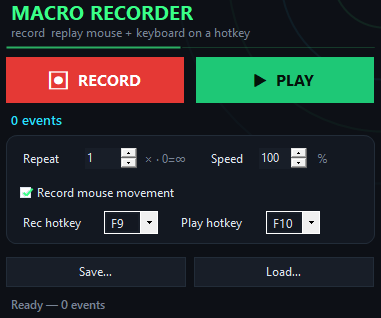
Anime Dice Macro app window on Windows
How it works
Inside the appAnime Dice Macro window

Your roll-and-claim sequence runs on repeat without your hands.

Once you press F9 and walk through your farming loop—rolling dice, collecting summons, clicking reward buttons—the macro captures every single action. Play it back at any speed and as many times as you need, while you step away or focus on something else.

Captures the whole chainEvery click on dice, every summon button, every claim tap gets recorded in sequence.
Replays at your paceSlow it down to watch what's happening, or speed it up to finish a hundred loops before lunch.
Runs in the backgroundPress F10 and the routine plays while you do something else—no need to keep the window focused.
Getting started

Set up your farming loop in four steps.

From first launch to automated farming takes less than five minutes.

Why automate

Why macro recording beats manual farming.

A hotkey beats a hundred clicks.

No setup, no learning curve

Open the app, press F9, perform your routine, press F9 again to save. That's it. Load a saved routine later and run it any time.

Stays out of the way

The macro doesn't touch game files or inject code. It replays normal mouse and keyboard input, just like your fingers would. The routine is stored as a plain file on your disk.

Works offline, works forever

No account, no internet check-in, no expiration. Download once and the tool works for as long as you have Windows. Free forever, no Pro tier.

Speed control keeps it safe

Slow down to 10% speed to watch your routine step by step and catch any timing issues before you let it run full speed.

Requirements

Anime Dice Macro at a glance.

Version1.0.0
PlatformWindows 10 and 11, 64-bit
InstallQuick download, no account
LicenseMIT, source on GitHub
PriceFree, no account
LanguageEnglish
vs. manual clicking

How it compares to clicking by hand.

The difference between farming for an hour and walking away.

Anime Dice Macro

  • Time per loop — 5 seconds at full speed
  • Breaks and fatigue — Zero—routine runs itself
  • Consistency — Identical every replay
  • Cost — Free, always
  • Setup complexity — Record once, reuse forever
  • Works offline — Yes, completely

Manual clicking

  • Time per loop — 2–3 minutes per cycle
  • Breaks and fatigue — Required after every few loops
  • Consistency — Variable, prone to mistakes
  • Cost — Your time, hours of it
  • Setup complexity — Manual every single session
  • Works offline — Yes, but still requires you
Macro questions

Questions about macros and farming.

Will this get me banned from Anime Dice?

The macro replays ordinary keyboard and mouse input—the same inputs your hands would send. It doesn't inject code into the game or modify how it runs. Whether the game allows macros is up to you to check in their rules; the tool itself just records and plays back standard input.

Can I pause and resume a recording?

No. Press F9 to start recording and F9 again to stop. If you need a more complex routine, record it as one continuous flow.

What if my farming loop is different each day?

Record a new macro each time. You can save multiple routines to separate files, so one version for rolling, another for claiming, another for a full cycle—load whichever you need.

Does it work if I have two monitors?

Yes. Clicks are recorded with their exact screen coordinates, so as long as you replay on the same setup, they land in the same spots. Moving to a different resolution may shift where clicks land.

Can I change the hotkeys from F9 and F10?

Yes. Open the app and rebind them to whatever keys you prefer in the settings.

What happens if I lose power while the macro is running?

It stops immediately. The routine file is not affected. Start the app again and replay from where you left off.

Is there a limit to how long a routine can be?

No practical limit. Record a five-minute farming loop or a thirty-second quick cycle—both work the same way.
Stop farming by hand. Start farming by hotkey.

Download the macro, record your routine once, and press F10 whenever you want to run it again.

Download for Windows
Latest release · v1.0.0

Anime Dice Macro guides